Tokens View
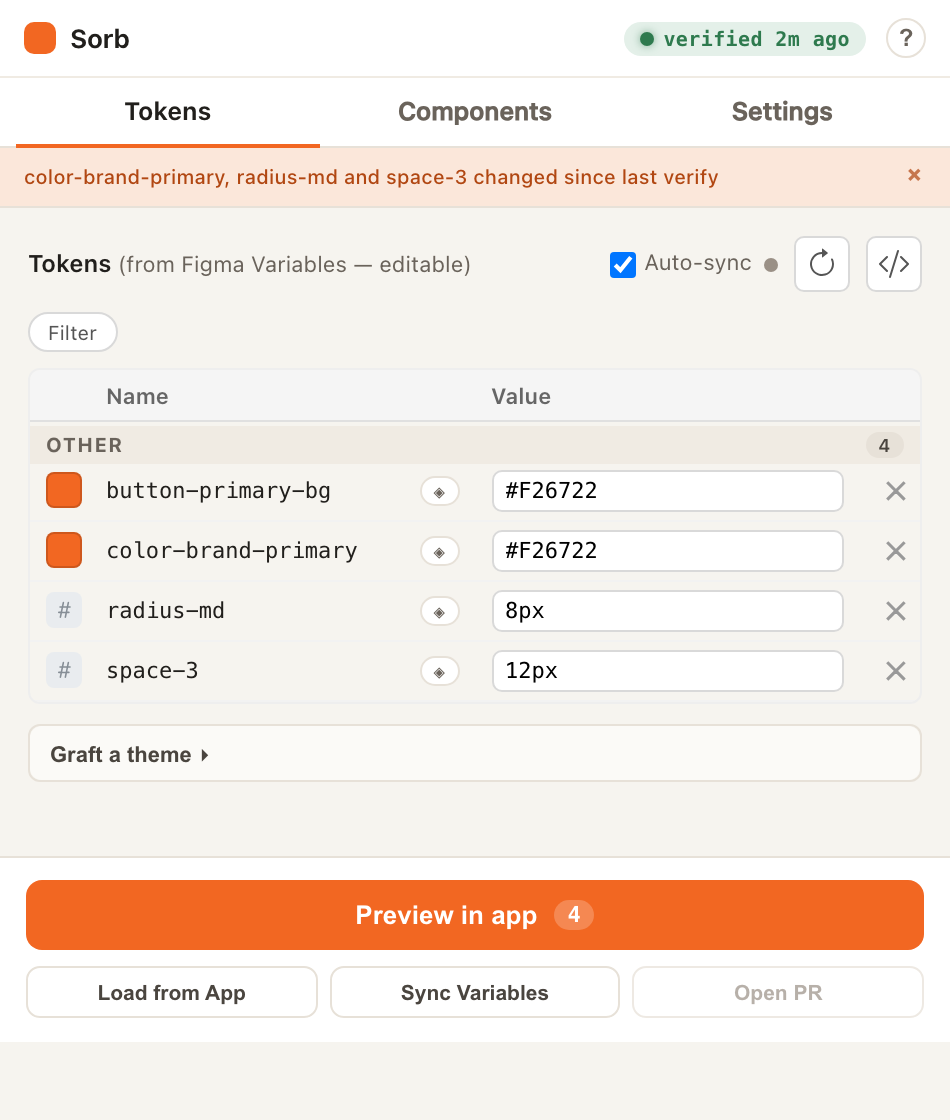
The primary workspace. Tokens View shows your working set of design tokens as an editable table, with toolbar actions for syncing between Figma, the bridge, and your live app.
Layout at a glance
┌──────────────────────────────────────────┐
│ [Tokens ▼]  [Storybook]  [⚙ Settings]     │  ← tab bar
├──────────────────────────────────────────┤
│ 🔄 Load from App   🔄 Load from Figma      │  ← toolbar row 1
│ 👁 Preview   📖 Storybook   ⟳ Sync Vars    │  ← toolbar row 2
├──────────────────────────────────────────┤
│ Auto-sync [✓]                     </>      │  ← controls bar
├──────────────────────────────────────────┤
│ [Filter ▾]                                 │  ← filter chips
├──────────────────────────────────────────┤
│ ⬛ color/action/primary  #f26722   [✕]     │
│ 🔢 spacing/md            16px      [✕]     │
│ 🅐 font/body/size        1rem      [✕]     │  ← token rows
├──────────────────────────────────────────┤
│ 42 token(s) loaded · Open PR               │  ← status bar
└──────────────────────────────────────────┘
Toolbar
| Button | What it does |
|---|---|
| Load from App | GET /tokens/latest — pulls the current committed token set and replaces the working set. |
| Load from Figma | Re-collects fresh Figma Variable values and merges them into the working set. |
| Preview in app | Opens a live session in your app (?preview=<id>) that auto-pushes edits as you type. |
| Preview in Storybook | The same live session, opened against your Storybook URL. |
| Sync Variables from code | GET /tokens/resolved → creates/updates Figma Variables in three collections (Primitives, Semantic, Component). Idempotent — safe to re-run. |
The token table
Each row shows:
- Type icon — inferred from the value: color swatch, number, text, or boolean toggle.
- Name — the token id in dotted/slashed form (read-only here).
- Value — inline-editable, with type-aware validation. Colors accept hex/rgb/hsl; dimensions accept
px/rem/em/%/vh/vw/pt; booleans accepttrue/false. An invalid value shows a red border and is never written. - Delete (✕) — removes the token from the working set only. This is non-destructive — it doesn't touch your Figma Variables.
Live preview session
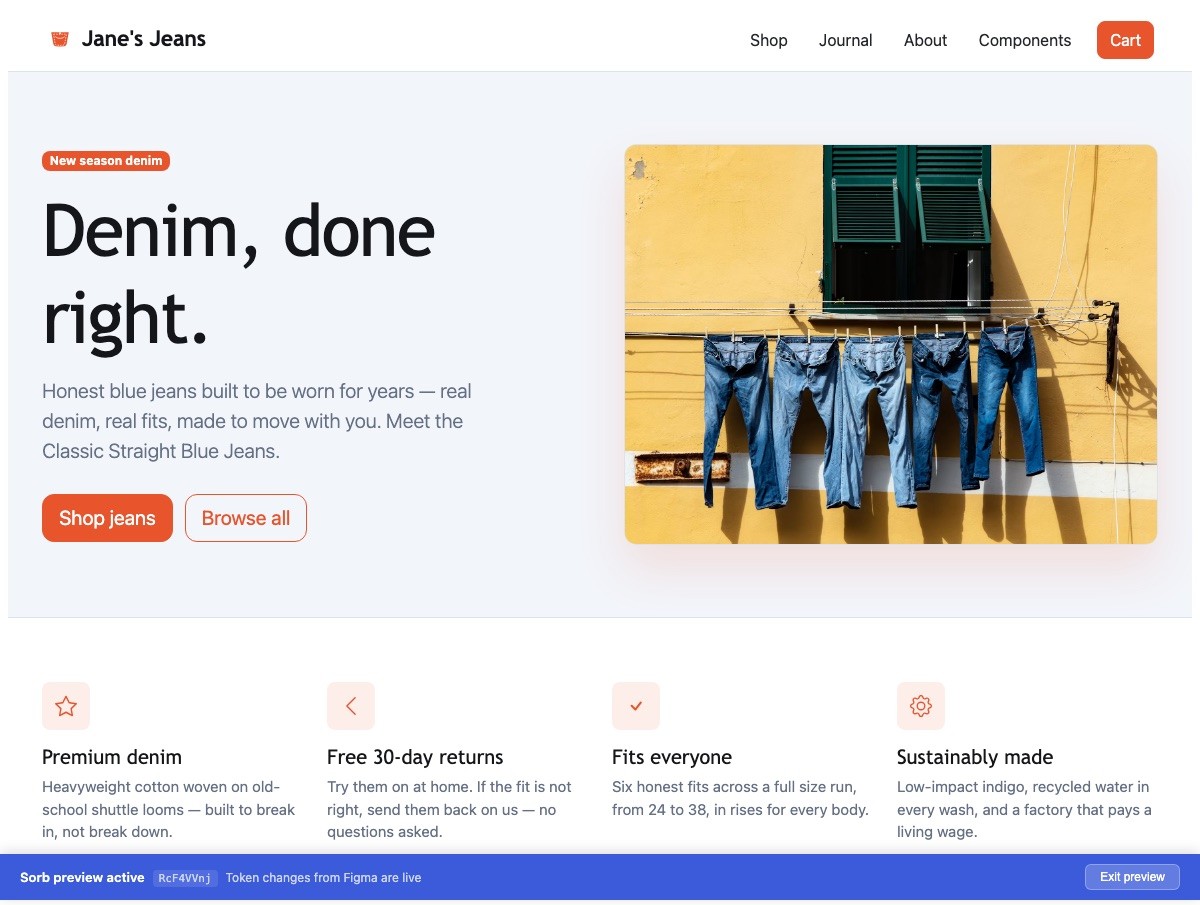
Clicking Preview in app (or Preview in Storybook) opens a live session.
While it's active, every edit is pushed to the bridge (PUT /preview/{id},
debounced ~250 ms), so your real component re-skins as you type. The session is
torn down when you toggle auto-sync off or close the window.
Auto-sync
The Auto-sync toggle watches your Figma Variables (a ~1.5 s poll plus a document-change accelerator) and updates the working set when they change.
- Dirty-guard: if you have an unsaved edit, auto-updates are held back and a "Figma changed — Refresh" link appears instead — so an incoming change can't clobber your in-progress edit.
- The setting persists locally; default ON.
Raw JSON editor (</>)
The </> toggle swaps the table for a textarea with the full working-set JSON.
Edits are parsed on a 300 ms debounce; invalid JSON is ignored (no overwrite). If
a live preview session is active, valid edits are pushed to the bridge.
Filter chips
When two or more groups are detected, a [Filter ▾] chip appears (collapsed by default to avoid clutter). Color and button sub-groups get fine-grained chips; everything else groups by the first name segment.
Status bar & Open PR
The status bar shows the token count and a contextual Open PR action:
Open PR merges your working-set edits onto the committed set, copies the full
tokens.json to the clipboard, and opens the GitHub web editor at the configured
file URL — so you can review and submit the change.
Next
Works with Figma. Not affiliated with, or endorsed by, Figma. Figma is a trademark of Figma, Inc.